
 Install Chrome Extension
 Install Firefox Extension
Official store links only
Direct retailer or official event destinations, with no affiliate links or paid click detours.
Drops don't keep a schedule. When one goes live, Autoqueue opens it in your browser automatically: the store queue or the product page itself. No Discord. No refreshing. You were busy, and you're still ahead of the crowd. You handle the waiting room, captcha, cart, and checkout.
Autoqueue sent at least one member alert for each reported live signal (times ET):
Shows every evidenced live signal from the last seven days, plus the most recent signal for retailers that were quiet this week.
These alerts and the 7-day count do not prove stock availability, browser execution, queue entry, or a completed purchase.
Setup takes two minutes. Everything after is automatic.
Direct retailer or official event destinations, with no affiliate links or paid click detours.
It does not collect any data or read any web pages.
Retailer compliant. It alerts you and opens the store. You handle the queue, captcha, cart, and checkout yourself.
Scheduled releases are the easy part: everyone knows when to show up. Most restocks just happen, and they are decided by who finds out while stock still exists. That is the race Autoqueue runs for you.
11:07 a.m. on a Tuesday
Queues have appeared in the middle of a random weekday with zero warning. Your tab is in line immediately; the crowd arrives minutes later, thousands of spots behind you.
4:38 p.m. on a Wednesday
The next one could land at any minute of any day. There is no schedule to plan around, which is the point: Autoqueue works around the clock so you never have to.
1 hour early
Announced releases get an advance heads-up and a get-ready reminder about an hour out. The difference shows on the ones never announced at all.
Live scheduled endpoint checks and incident history on Autoqueue's own status site. If live state cannot be reached, this indicator shows Unknown. Opens in a new tab.
Autoqueue runs on cloud infrastructure from Amazon Web Services and Google Cloud.
Autoqueue is a timing assistant. It opens the official queue or product page when a watched drop fires, then you take over and shop by hand.
On high-demand Pokémon and One Piece TCG drops, saving even a few seconds can mean thousands of spots in a queue or reaching limited stock before it sells out.
The extension only opens your browser when a drop is detected. You handle the waiting room, captcha, cart, and checkout yourself.
Every account gets a dashboard that tunes how Autoqueue behaves. No support ticket needed.
Quiet Hours
NewPick the days and hours when Autoqueue stays silent.
Tab style
Open available product pages, including newly matched items, or keep each retailer event to one official store tab. Changed anytime from your dashboard.
Your stores and franchises
Alerts fire only where your selected franchises and stores overlap. A store you don't shop never opens a tab or emails you.
Browser switching
Your access key lives in one browser at a time, so it can't be shared. Move it yourself from the dashboard, no support ticket.
Weekly recap
A once-a-week summary of what fired, plus subscriber-only detail on what's coming. Separate from live alerts; opt in or out anytime.
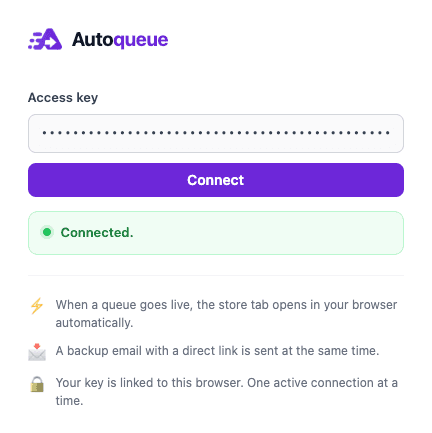
Setup is a single screen. Drop your access key into the Autoqueue extension and connect it to your browser. After that it runs quietly in the background, linked to your account, and opens the store the instant a drop goes live.
Get it for Chrome or Firefox, and the setup guide walks you through every step.
Cancel anytime. Same drop coverage on every plan.
Email alerts
Know the moment a drop goes live.
Pokémon Center is live
The email foundation every plan is built on.
Included
Email + 1 browser
The store page opens for you the instant it fires.
Opened for you. You join the line and check out.
Premium Alerts, plus a browser tab that opens itself.
What this plan adds
Text + 2 browsers
The live link reaches your phone by text.
Text message, delivered now
Auto-Queue, plus text alerts and a second browser.
What this plan adds
Every plan covers:
Review the filtering, direct-link model, and human-checkout boundary on How Autoqueue works, or inspect extension access and privacy controls in the Trust center.
Autoqueue ships continuously. Plans and timing can change, and we keep the roadmap current.
Every store runs its drops differently. These guides cover how to get in, and when we have actually seen each one go live.
Walmart Pokémon drawings and Walmart Wednesday drops use different entry paths. Find the official drawing page, understand the queue, and see what Autoqueue opens.
Queue storeHow to get into the Pokémon Center virtual queue, what the estimated wait means, why joining early decides preorders, and the drop times we have seen.
No queueTarget has no queue for Pokémon drops: stock goes live and sells out in minutes, and in our data it lands overnight. Restock times and how to be ready.
Members onlySam's Club Pokémon drops have landed around 10pm CT / 11pm ET, and online exclusives need a Plus membership. How to prepare, with recorded alert times.
Preorders & rafflesPremium Bandai sells One Piece TCG through timed preorder windows and lottery-style raffles, two systems that reward completely different behavior. How each works, and the drop times we have recorded.
Drop recaps plus guides to fast-moving queues and limited releases.
Autoqueue sent 8 evidence-backed live alerts across 2 retailers during October 17 to October 23. Target and Walmart tied with 4 alerts each. The record included 8 Pokémon TCG alerts.
Target accounted for all 2 evidence-backed live alerts on October 22, 2026. The first was sent at 10:52 AM ET and the last at 12:42 PM ET, with 1 hour and 50 minutes between them. Every event in this record involved Pokémon TCG.
Walmart accounted for all 3 evidence-backed live alerts on October 21, 2026. The first was sent at 5:03 PM ET and the last at 9:00 PM ET, with 3 hours and 57 minutes between them. Every event in this record involved Pokémon TCG.
Want the full filtering and evidence details? Read how Autoqueue works.